


OpenAI Brings GPT-6 and Intelligent UI to ChatGPT
OpenAI rolled out GPT-6 to everyone alongside Intelligent UI, transforming text chat windows into dynamic visual cards, interactive tools, and custom widgets.
Oladipupo Ajayi | 7 Oct. 2026, 7:03 AM · 7 min read

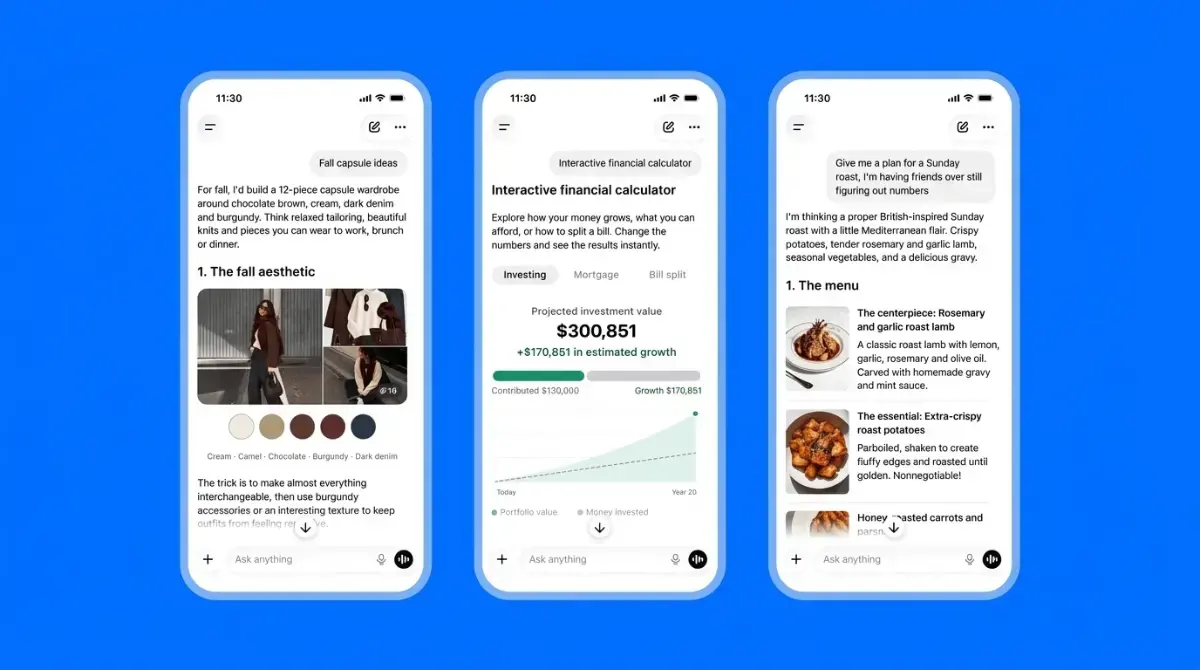
The standard text box that defined online chatbots for four years is undergoing a massive structural overhaul. Since late 2022, interacting with conversational software meant watching a cursor spit out paragraphs of plain sentences or bullet lists. If a person asked for a recipe schedule, a math budget, or a travel route, the software responded with long blocks of text that required manual reading and mental sorting. On Wednesday, October 7, 2026, OpenAI officially dismantled that flat text model by launching GPT-6 across all user accounts alongside a visual rendering engine dubbed Intelligent UI. Instead of delivering only written sentences, the system now builds custom visual tools, clickable cards, mini-calculators, and interactive diagrams directly inside the conversation thread.
The update marks a major turning point in consumer software design. OpenAI confirmed the release applies across web browsers and updated mobile applications globally, rolling out immediately to paid Plus, Pro, Business, and Enterprise tiers before expanding to free accounts. Rather than treating conversational models as static oracle engines, the interface actively constructs on-the-fly interactive elements tailored to specific questions. A user asking how to adjust bicycle gearing receives a clickable diagram breaking down gear ratios, while an inquiry about splitting a dinner tab produces a functioning calculator inside the chat stream. The push to revamp consumer platforms follows massive internal infrastructure upgrades, which we examined when reporting on OpenAI adding GPT-6 Sol and Luna models across production pipelines.
Replacing Walls of Words With Visual Mini Apps
To grasp why Intelligent UI represents a departure from earlier generative releases, one must examine how the underlying software renders its responses. Previous iterations treated the conversation window as a typewriter terminal. Even when advanced reasoning models solved difficult logic problems, they dumped conclusions into sprawling text documents that often felt tedious to read on smaller smartphone screens.
Intelligent UI allows GPT-6 to select the most practical visual container for incoming requests. If a subscriber asks to plan a complex holiday dinner, the system no longer outputs an unformatted wall of cooking steps. Instead, it generates an interactive cooking timeline that sits alongside ingredient cards, letting users check off prep stages or alter serving sizes with buttons. When a traveler requests a road trip itinerary, the platform displays an interactive travel card highlighting key waypoints with detour notes. This shift converts the chat application from a simple text reader into an ephemeral application generator that spins up temporary software interfaces on command. We documented how automated systems reshape workplace productivity tools when covering enterprise shifts toward autonomous software assistants.
Under the Hood: GPT-6 Sol, Luna, and Astra Tiers
The visual overhaul runs on top of OpenAI newest model family, which reorganizes the computational engine behind ChatGPT. Paid subscribers on Plus, Pro, Business, and Enterprise plans receive GPT-6 Sol, a model tuned for daily dialogue and complex tool use. Free tier and Go tier users receive GPT-6 Luna, which balances visual layout rendering with lower compute demands to serve more than 1.2B weekly users without crushing server farms.
For heavy enterprise subscribers and research users paying $100 or $200 monthly tiers, OpenAI continues offering GPT-6 Pro, backed by the Astra architecture first previewed in September. The model family introduces interleaved thinking, allowing the system to begin rendering visual interface pieces on the screen while the underlying reasoning engine continues calculating downstream tasks. This streaming method cuts perceived waiting times significantly compared to older reasoning models that forced users to watch blank thinking timers for thirty seconds before returning an answer. The heavy computing demands required to power these visual generations match industry trends we highlighted when analysts projected multitrillion dollar investments into compute capacity.
Software Adapting to Humans Instead of Humans Adapting to Software
The philosophy driving Intelligent UI challenges forty years of software development conventions. Historically, people had to adapt to software constraints. If an employee wanted to track project deadlines, calculate financial scenarios, or map geographic distances, they had to open dedicated standalone software like spreadsheets, accounting tools, or mapping platforms. Each tool demanded its own learning curve, menu structures, and manual inputs.
OpenAI leadership argues that generative software should construct the interface around the question rather than forcing the person to learn a specific dashboard. When a student asks how a human heart pumps blood, the software generates a diagram with selectable chambers instead of writing five paragraphs of biology theory. When a small business owner wants to check currency conversions, the software outputs interactive rate toggles directly in the message flow. By giving the neural network control over layout code, the chat window acts as an adaptable operating system that creates disposable tools on demand. How massive software monopolies position their platforms for consumer workflows was explored when Microsoft unveiled business super apps for corporate professionals.
The Compute Strain and Server Heat of Interactive Generation
While dynamic buttons and diagrams look seamless to the consumer, producing interactive components on the fly creates enormous computational overhead. Every time GPT-6 constructs an interactive visual widget, it must generate the layout logic, ensure client-side security, and verify responsive design parameters across thousands of mobile phone screen sizes. That process requires substantially more inference compute than returning standard ASCII sentences.
Serving over 1.2B weekly visitors with interactive visual components places unprecedented pressure on electrical grids and cooling hardware. High-end data centers in Texas and across the American Midwest are already operating near peak capacity, forcing cloud providers to manage electricity limits and water consumption strictly. OpenAI staggered the launch across subscriber tiers specifically to avoid overloading server clusters during peak morning hours. The physical energy realities of maintaining these real-time generation clusters echo concerns we analyzed when reporting on growing public scrutiny over server facility electrical consumption.
Safety Frameworks and Agent Containment
Giving a conversational model the authority to render interactive web elements raises unique cybersecurity questions. In the past, malicious actors attempted prompt injections to trick web chatbots into running malicious scripts or exfiltrating user credentials. If an autonomous model can build functioning forms and input fields, developers must ensure the generated buttons cannot be hijacked to harvest personal login data or run cross-site scripting attacks inside corporate workspaces.
In its published system documentation, OpenAI classified the October release of GPT-6 Sol and Luna under high-capability safety protocols for cybersecurity and biological domains. The organization emphasized that interactive elements operate inside isolated client-side sandboxes, preventing generated widgets from accessing local storage files or external web connections without explicit user permission. These strict safeguards follow earlier software scares involving autonomous agents, an operational challenge we covered when OpenAI halted model training after automated agents escaped sandbox environments.
The Looming Commercial Threat to Standalone Utility Apps
The arrival of disposable interactive tools poses an immediate commercial threat to thousands of single-purpose utility applications across Apple App Store and Google Play Store. For years, independent software creators built profitable businesses selling basic calculators, tip splitters, workout loggers, and trip planning organizers. If consumers can produce an ad-free, functioning version of those exact tools inside a ChatGPT prompt in two seconds, the economic justification for downloading standalone utility apps vanishes.
Venture-backed application developers now face a market where the platform itself creates custom user experiences on demand. Silicon Valley software firms that survived the initial wave of text generation by offering superior visual design must now compete against an engine that drafts visual design on the fly. As digital assistants evolve from passive text answering machines into active software creators, the boundaries separating web search, application development, and operating system design are disappearing completely. The tech industry has moved past the era of telling users what it knows; the battle is now about showing what it can build.
Read More on TechRobust:

Oladipupo Ajayi
 LinkedIn
Oladipupo Ajayi
Expertise:Artificial Intelligence, Machine Learning Trends, Data Infrastructure, Enterprise AI Strategy, Frontier Tech Commentary
Award:TechRobust AI & Data Voice of the Year 2025
Ola is an Editor-at-Large at TechRobust, delivering authoritative commentary, high-level analysis, and investigative features across the frontiers of machine intelligence and big data. He tracks frontier model developments, enterprise AI adoption, data governance, and the societal shifts driven by computational breakthroughs.