


Googlebooks From Dell, Lenovo, And HP Tested In Real World
Independent lab testing on new Googlebooks from Dell, HP, and Lenovo reveals impressive physical manufacturing and crisp OLED screens, but the unbaked operating system behaves like a mobile phone awkwardly stretched onto desktop hardware.
Goriola Ayankoya | 15 Oct. 2026, 3:47 PM · 9 min read

Chromebooks spent fifteen years trapped in an educational ghetto. School districts purchased millions of plastic, low-cost laptops because administrators could manage permissions easily and replace broken hardware for $200. That cheap educational reputation poisoned the brand for adult professionals, who viewed the devices as glorified web browsers incapable of running serious desktop software. Google is attempting to destroy that stigma once and for all. The search giant partnered with three of the largest computer makers on Earth to launch a brand new hardware category known simply as Googlebooks. We covered the initial ambition behind this strategy when Google launched an $899 Googlebook Gemini laptop to challenge traditional desktop operating systems. Now that production units from Dell, HP, and Lenovo have landed on testing benches, the verdict is clear. The physical laptops look and feel exceptional, but the underlying software remains stuck in an awkward identity crisis.
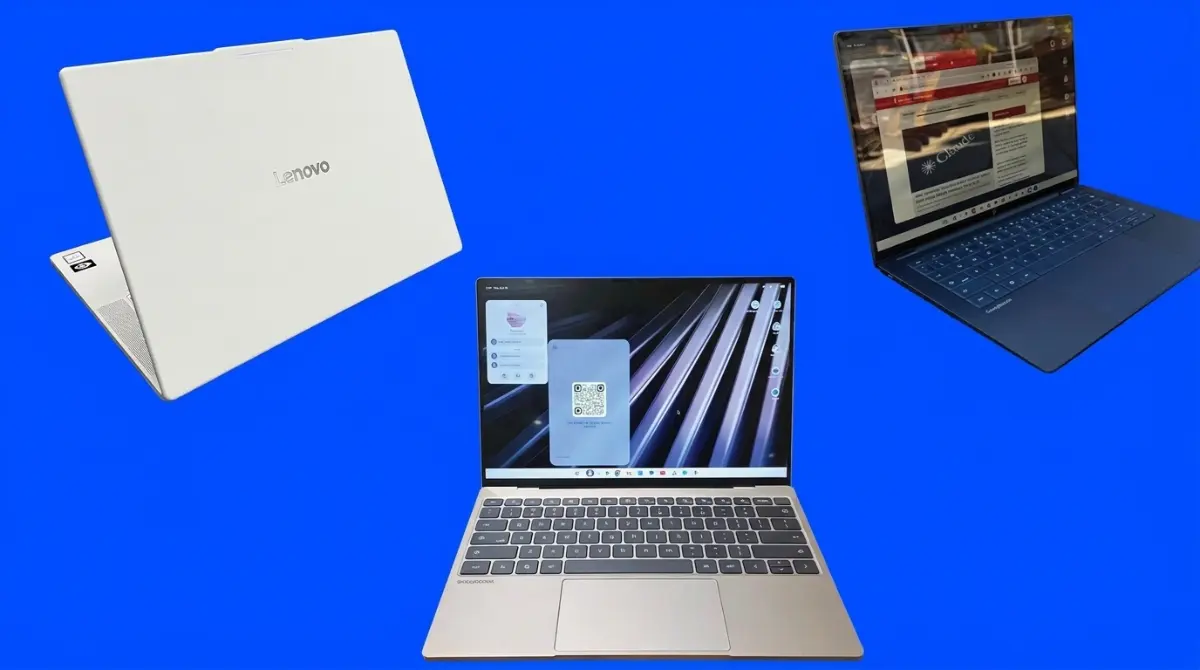
The machines command premium prices, ranging from $899 for entry configurations up to $1,299 for top-tier models. At these price tiers, consumers expect build quality that rivals premium metal laptops. The hardware partners delivered on that expectation. The HP Googlebook 14 stands out with a rigid aluminum unibody, a silent tactile trackpad, and a keyboard deck that does not flex under heavy typing pressure. Dell adapted its premium industrial design to create the Dell XPS Googlebook, packing a bright edge-to-edge display into a razor-thin profile. Lenovo took a lighter path with the Lenovo Googlebook 15, blending carbon fiber with magnesium and aluminum to produce an airy white notebook that weighs only 2.84 pounds despite housing a massive 15.3-inch OLED panel. The hardware easily holds its own against Windows alternatives, matching the design polish we tracked when reviewing the Dell 14s laptop as a MacBook alternative.
The trouble begins the moment you press the power button. Googlebooks do not run standard ChromeOS. Instead, they debut Googlebook OS, a hybrid software platform that attempts to weld a Chrome web browser to a native Android execution stack. The marketing pitch promises that Android users will finally enjoy frictionless desktop continuity, mimicking the relationship between an iPhone and a Mac. In real-world testing, the operating system feels less like a refined desktop platform and more like a mobile phone interface forced onto a physical keyboard. Menus are oversized, basic desktop conventions are missing, and system background processes consume massive computational resources before you even launch a program.
Silicon Showdown: Qualcomm Snapdragon Versus Intel Panther Lake
Google chose a split silicon roadmap to power these new notebooks. The Dell XPS Googlebook and HP Googlebook 14 run on Qualcomm Snapdragon X Elite processors, relying on Arm architecture to deliver high battery longevity. In contrast, the Lenovo Googlebook 15 houses an Intel Core Ultra 5 325 processor built on the newer Panther Lake process node. This dual-vendor strategy provides an interesting benchmark showdown between competing silicon designs. In synthetic processor evaluations like Geekbench, the Qualcomm chips outperformed the Intel machine in multi-core compute, delivering fast compilation speeds and snappy application launches. The race for mobile silicon dominance is accelerating everywhere, as seen during the Qualcomm Snapdragon 8 Elite Gen 6 Extreme launch.
The picture inverted when running browser-centric workloads. On WebXPRT4, an evaluation designed to measure complex web applications, financial modeling scripts, and online photo filtering, the Intel-powered Lenovo system pulled ahead. Google frequently claims that modern computer users spend over seventy percent of their working hours inside a web browser, making single-thread web execution vital. CrossMark productivity tests painted a similar story: the Intel configuration secured higher marks for everyday document creation and system responsiveness, while the Qualcomm processors won in creative multimedia rendering. Neither platform could touch the raw graphics performance of Apple modern silicon, but for general business productivity, both chipsets provide ample calculation speed.
| Model Tested | Processor | RAM / Storage | Display Panel | Starting Price |
|---|---|---|---|---|
| Dell XPS Googlebook | Snapdragon X Elite | 16GB / 512GB | 13.4-inch LCD | $999 |
| HP Googlebook 14 | Snapdragon X Elite | 16GB / 512GB | 14.0-inch OLED | $1,149 |
| Lenovo Googlebook 15 | Intel Core Ultra 5 325 | 16GB / 512GB | 15.3-inch OLED | $1,099 |
Battery longevity revealed the first major gap between corporate marketing and physical reality. Retail boxes boast battery endurance figures ranging between fourteen and sixteen hours on a single charge. Standardized testing tell a different story. In continuous web-browsing scripts cycling through thirty live web destinations at 150 nits of screen brightness, the HP Googlebook 14 lasted 11 hours and 52 minutes. The Lenovo Googlebook 15 lasted 10 hours and 25 minutes, while the Dell XPS barely reached 10 hours and 4 minutes. These are acceptable results for an eight-hour office day, but they fall hours short of advertised numbers and lag far behind competing Apple laptops that routinely cross eighteen hours. Power consumption remains a thorny issue across consumer electronics, matching the challenges we documented in our iPhone 18 Pro Max review.
The Operating System Identity Crisis
The fundamental flaw of the Googlebook platform lies in user interface design. Rather than designing a dedicated desktop environment from scratch, Google adapted elements from Android tablet software. The desktop spacing feels entirely wrong for mouse and keyboard navigation. Right-clicking an open folder reveals a contextual menu with massive white borders and separated buttons. The spacing makes sense if you touch the screen with a wide thumb, but when using an accurate glass trackpad, the excessive padding looks sloppy and forces unnecessary hand travel.
Basic desktop navigation conventions that computer users have relied on for thirty years are mysteriously absent. The native file browser does not include standard forward and back navigation buttons. If you open a folder deep inside a sub-directory, you cannot click a simple back arrow to return to the parent view; you must manually click folder path breadcrumbs located along the bottom edge of the display. The file directory refuses to let users drag, pin, or rearrange favorite folders along the left navigation sidebar. These are not advanced professional features. They are basic usability elements that exist in every version of Windows, macOS, and Linux.
The application situation is equally frustrating. Opening Gmail or Google Calendar does not launch a true native software client. The operating system simply opens a web browser window wrapped inside a colored header bar. Messages functions as an actual Android application, but during setup, the operating system attempts to automatically migrate applications from your paired smartphone. The tool selected Apple Music, designating it as optimized for desktop, while leaving out critical communication tools. When mobile applications do run, their aspect ratios frequently fail to adapt to widescreen laptop dimensions, leaving massive black columns flanking the content like a vertical phone screen floating in empty space.
The 8GB Background Memory Tax
Every Googlebook sold across retail channels includes at least 16GB of system memory. While 16GB sounds generous for a machine that traces its lineage back to lightweight Chromebooks, system monitors expose a startling secret. The moment you boot the computer to an empty desktop, the operating system consumes between 7GB and 8GB of active memory. Half of your physical hardware capacity is locked down before you launch a single browser tab or open a work spreadsheet.
This massive memory reservation supports local machine learning models. Google permanently parks Gemini reasoning parameters inside active system memory so that voice dictation, text summaries, and contextual search tools respond instantly without web lag. While local processing prevents data from traveling across external servers, dedicating half of the machine memory to background software limits multitasking. If you open twenty browser tabs while running a video call and editing an image, memory pressure spikes rapidly, forcing the system to quietly purge background tabs. Memory management has become a major flashpoint across personal computing, a reality we analyzed when Apple Intelligence demanded 30GB of storage on macOS.
The artificial intelligence features that consume this memory often feel experimental rather than indispensable. The system can summarize web pages, rewrite emails in different tones, and organize research documents inside Google Docs. These tools mirror the cloud products we evaluated when Google Cloud launched Gemini agent work tools. Yet, few users will find that a paragraph rewriter justifies sacrificing half of their laptop physical memory. When memory runs low, the operating system stutters, undermining the smooth performance that buyers expect when paying over $1,000.
Cross-Device Syncing and Virtualization Glitches
The central promise of Googlebook OS is deep cross-device integration with Android smartphones. When it functions correctly, the utility is obvious. Notifications from your phone appear instantly in the laptop notification shade, and a dedicated folder inside the Files application lets you drag and drop images wirelessly between devices without third-party cords or messaging apps. The continuity aims to recreate the seamless ecosystem integration that Apple perfected a decade ago.
In practice, establishing that connection is an exercise in technical patience. The reviewer guide supplied by Google contains multi-step troubleshooting instructions to enable cross-device features, including repeated network resets, Bluetooth toggles, and multiple QR code scans. Even after successful pairing, the link frequently drops. Test files dragged from the laptop to a nearby phone occasionally vanished into digital limbo without an error message, while phone notifications arrived inconsistently. The mobile division has built superb hardware over the years, celebrated in our retrospective on the Google Pixel 10-year anniversary, but connecting that phone hardware to a desktop laptop remains an unpolished work in progress.
For technical users and software developers, Google includes a pre-installed Debian Linux virtual machine accessible through a native terminal. In theory, this allows users to install full desktop Linux software, including image editors like GIMP or gaming platforms like Steam. In reality, the virtualization container suffers from noticeable input lag. Playing lightweight games like Dead Cells produced audio popping and groaning artifacts through the laptop speakers. Window resizing inside Linux applications stuttered heavily, and because files stored inside the virtual container remain segregated from the main file system, moving project assets between environments creates unnecessary manual steps. The virtualization layer lacks the polish of professional developer tools.
The Commercial Verdict: Beautiful Shells Awaiting Finished Code
Dell, Lenovo, and HP did their jobs with distinction. The hardware partners engineered thin, beautiful, mechanically sound notebooks equipped with responsive keyboards and gorgeous OLED displays. The hardware matches or beats what you will find in competing Windows notebooks like the Microsoft Surface Laptop Ultra. But great hardware cannot rescue unready software. Google rushed Googlebook OS to market to hit the holiday shopping cycle, leaving its hardware partners to sell computers burdened by half-baked tablet interfaces and frustrating file management.
Unless you are an adventurous enthusiast willing to act as an unpaid beta tester, buying a Googlebook right now makes little financial sense. If you need a reliable work machine for web browsing and office documents, traditional Chromebooks offer similar real-world capabilities for half the price. If you need a serious computer for professional creative work and local software development, established Windows machines or MacBook laptops provide infinitely superior desktop operating systems. Google may eventually patch these usability flaws and turn Googlebook OS into a genuine contender. For now, the hardware shines, but the software belongs back in the engineering laboratory.
Read More on TechRobust:
Goriola Ayankoya
 LinkedIn
Goriola Ayankoya
Expertise:Consumer Hardware, Smartphone Trends, Gadget Reviews, Breaking Tech News, Mobile Ecosystems
Award:TechRobust Hardware Reporter of the Year 2025
Goriola is a Staff Writer and Reporter specializing in consumer technology, breaking tech news, and hands-on hardware analysis. He tracks fast-paced mobile developments, reviews modern gadgets, and unpacks product launches to give readers clear, practical insights into everyday consumer tech.